Three ways to play. Pick the one that matches your device.
Download the app
One file called an APK. It installs like a normal app and then works without internet. This is the best way to play on Android.
Download for Android ↓86 MB · needs Android 10 or newer · version 7.1.0
Play in Safari
There is no App Store version yet. The browser version plays the same game. Open the link in Safari, then add it to your Home Screen so it opens like an app.
Open the game in your browser ↗Nothing to install · not yet tested on a real iPhone or iPad (see section 06)
Play in your browser
The same link works in an up-to-date browser on a computer. No download needed. Tested in Chrome and Edge.
Play in your browser ↗Also works on Android if you would rather not install anything
Real chess, with a cast of characters.
Battlefield Chess follows the normal rules of chess. The difference is what you see: the pieces are armored foot soldiers, mounted knights, spellcasters and living castles, standing in a castle courtyard. When one piece captures another, the two fight a short battle on the board. The chess result is decided first, so the animation never changes who wins the square.
You can play against the computer at twenty difficulty levels, from "First moves" up to "World-class engine". You can also play a friend on the same device, work through the built-in lessons and drills, or watch the battles in the gallery. Games save automatically, so you can stop and come back later.
Everything here works without an account. Online play is not available yet, because AutiTech does not run a public chess service. The Multiplayer screen only works if someone in your group hosts one. The sci-fi Starward Covenant armies are still being made and cannot be played or bought yet. Many of the battle animations are also early versions that we plan to improve.
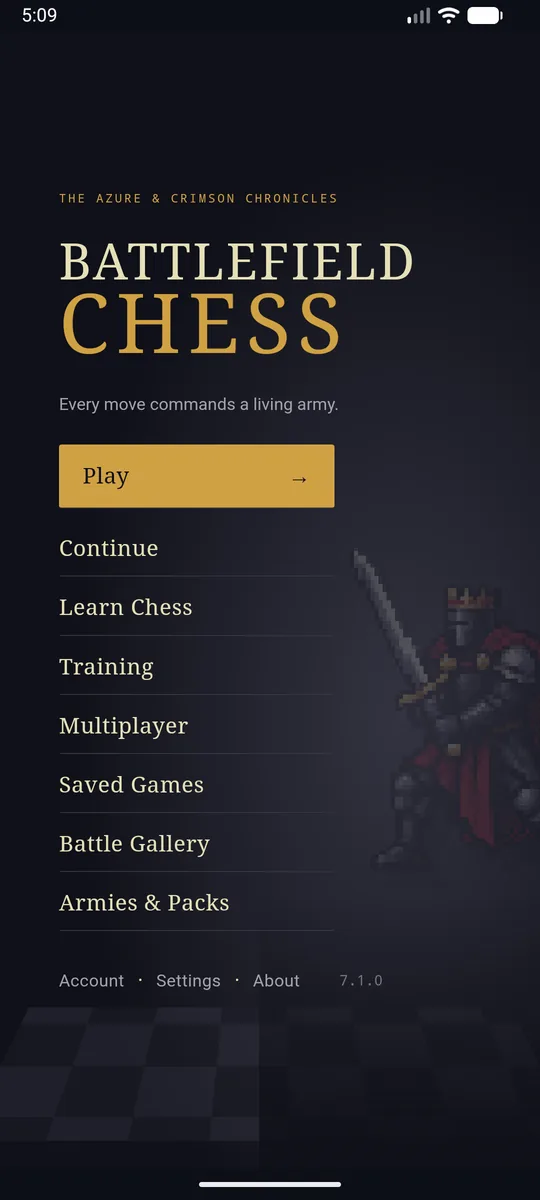
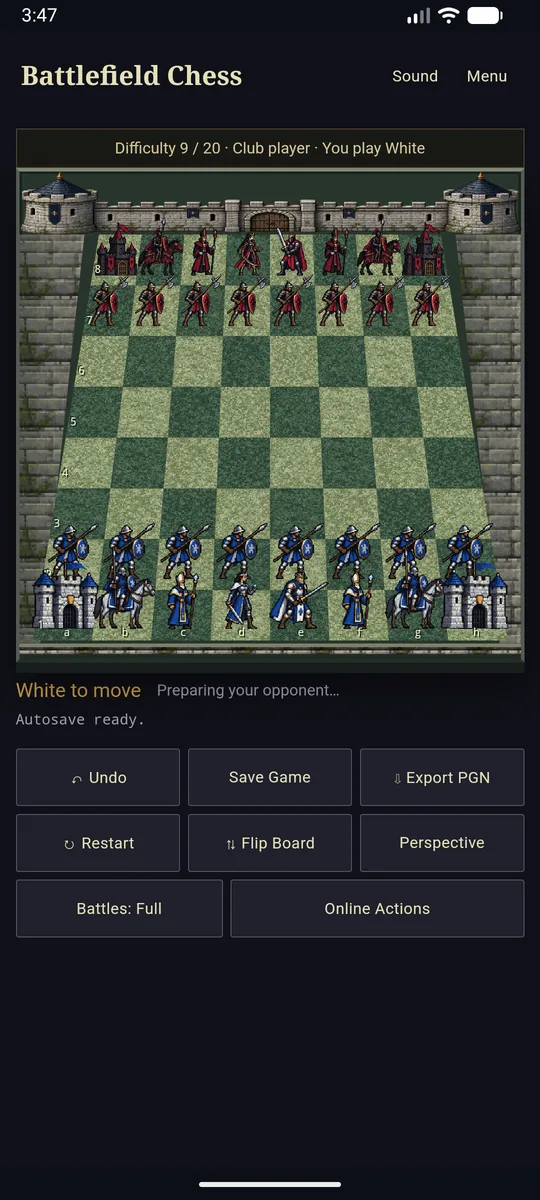
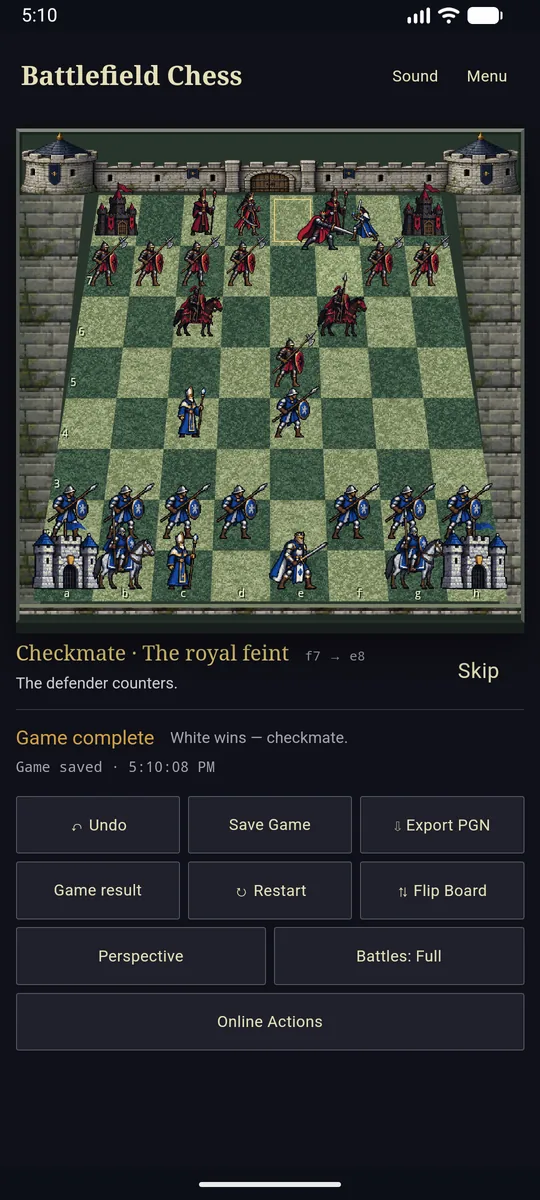
Screenshots from version 7.1.0 running in an Android 16 emulator.
Installing the app, step by step.
Because this app is downloaded from this website instead of the Google Play Store, Android asks you once for permission to install it. That warning is normal for any app that does not come from the store.
- Download the file. Tap the orange Download for Android button above. Your phone saves a file named
BattlefieldChess-7.1.0-Android.apk(about 86 MB). Wait for the download to finish. - Open the file. Pull down the notification bar and tap the finished download, or open the Files app and look in Downloads.
- Allow the install if asked. If your phone says "For your security, your phone is not allowed to install unknown apps from this source", tap Settings, switch on Allow from this source, then go back. You only have to do this once for your browser.
- Tap Install. Wait a few seconds, then tap Open. Battlefield Chess appears on your home screen like any other app.
- Google Play Protect may warn you, because this app does not come from the Play Store. The choice is yours. You can compare the file with the checksum in section 07 first, and the warning screen has an option to continue. If you would rather not, use the browser version instead.
Already have an older version?
Version 7.1.0 is signed with a new key, so Android will not update over version 7.0.0 or any earlier build. Uninstall the old Battlefield Chess first (press and hold its icon, then Uninstall), then install this one. Uninstalling also deletes the old version's saved games. To keep them, open the old version first and choose Saved Games, then Back up saves. After installing the new version, use Import backup on the same screen.
No install. Just open the link.
The browser version is the same game. The first visit downloads about 12 MB. After that your browser keeps a copy, so it also opens without internet (tested in Chrome and Edge). Your saved games stay in that browser on that device.
- Open chazk86.github.io/battlefield-chess/ in Safari, Chrome, Edge or Firefox.
- On an iPhone or iPad: tap the Share button (the square with an arrow), choose Add to Home Screen, then Add. The game now opens full-screen from its own icon.
- On Android: tap the browser menu (three dots) and choose Add to Home screen or Install app.
- On a computer: just bookmark it. Chrome and Edge may also offer an Install icon in the address bar.
Prefer to host it yourself? The browser version is also available as a zip file (8.3 MB): BattlefieldChess-7.1.0-Web.zip. Unzip it into any web server folder; it needs to be served over HTTPS or from localhost.
If you have never played chess, start here.
- Open the game and tap Learn Chess. It explains how each piece moves, with pictures, in a few minutes.
- Tap Training for short interactive drills that show you one idea at a time.
- Tap Play, then Face the computer. Pick difficulty 1 or 2 for your first games. Tap a piece to see every square it can move to, then tap where you want it to go.
- Captures start a battle. Sit back and watch, or tap Skip. Settings lets you turn battles to Fast or Off if you just want to play quickly.
- The goal is checkmate: trap the other king so it cannot escape. The game tells you when a king is in check and when the game is over.
System requirements.
Android app
- Android 10 or newer
- Keep about 200 MB of free space
- No internet needed after installing
Browser version
- A recent version of Chrome, Edge, Firefox or Safari
- Internet for the first visit (about 12 MB)
- A browser that allows site storage, or your games will not save
The Android app uses the full-size chess engine. The browser version uses a much smaller one so it loads quickly, so it may play less strongly at the highest levels. Everything else is the same.
What we have tested so far
- Tested: the Android app on an Android 16 emulator (a phone simulated on a computer), and the browser version in Chrome and Edge on Windows.
- Not tested yet: this version on a physical Android phone, on any iPhone or iPad, and in Firefox or Safari. It should work there, but we cannot promise it yet. If something goes wrong, please tell us.
Release details.
| Version | 7.1.0 (build 70100) |
|---|---|
| Released | November 3, 2026 |
| Android file | BattlefieldChess-7.1.0-Android.apk · 86,019,938 bytes |
| APK SHA-256 | 91dd9654114dff5cc6c063a11a77b0bc24219d8f1e9a063d529dd6625d7136c6 |
| App signing certificate SHA-256 | e8bf1f8b6b4c01c0f2f270e9910bc605a889f6642e1884e4963dc1229518741c |
| Browser zip SHA-256 | 737905eede48cb9936af69c17e3fa9b3a43bd3ca59565f0413872f96a57e7a35 |
| Android package name | com.hexworks.battlefieldchess |
A checksum is a fingerprint of the exact file. If you want to be sure your download is the real one, compare its SHA-256 with the value above (on Windows: open PowerShell and run Get-FileHash on the file). The Android app is not yet in the Google Play Store; store availability is a separate step.
Also available: sci-fi animation preview (not the game)
A separate preview app shows 40 early animation studies for the upcoming Starward Covenant sci-fi set. It is for people curious about the artwork, and you cannot play chess with that set. You can only have one of the two on a device. Android will refuse to install the preview while the game is installed, and the other way round, so you would have to uninstall one first, which deletes its saved games. Download the preview (192 MB) · SHA-256 868c65cefa448921f14007acd954a112699983a13b0c9d89d04d9041861c017a
Free to play. Not free to copy.
Copyright © 2026 AutiTech LLC. All rights reserved. Battlefield Chess is free for your own personal play. It is not open-source software.
- You may download, install and play it on your own devices, and back up your saved games.
- You may not copy or share the game files, re-host it, modify it, sell it, or reuse its artwork, animation, music or sound without written permission.
Read the full license. For permission requests, contact us.
The Stockfish chess engine inside the game is a separate program under the GNU General Public License version 3, and that license still applies to it. Its license and source are on the release page.