The collection becomes an experience.
A large collection is only useful if people can find what they want, understand what an installation needs, and recover when something interrupts it. I wanted that practical foundation to feel enjoyable too: selecting a platform should bring its hardware and physical media to life.
ACTUAL APPLICATION ANIMATIONS
A little ritual.
Before you play.
Four playable recordings from the packaged 1.8.0 viewer. These are the project’s authored 3D console presentations, captured directly from its models and animation code.
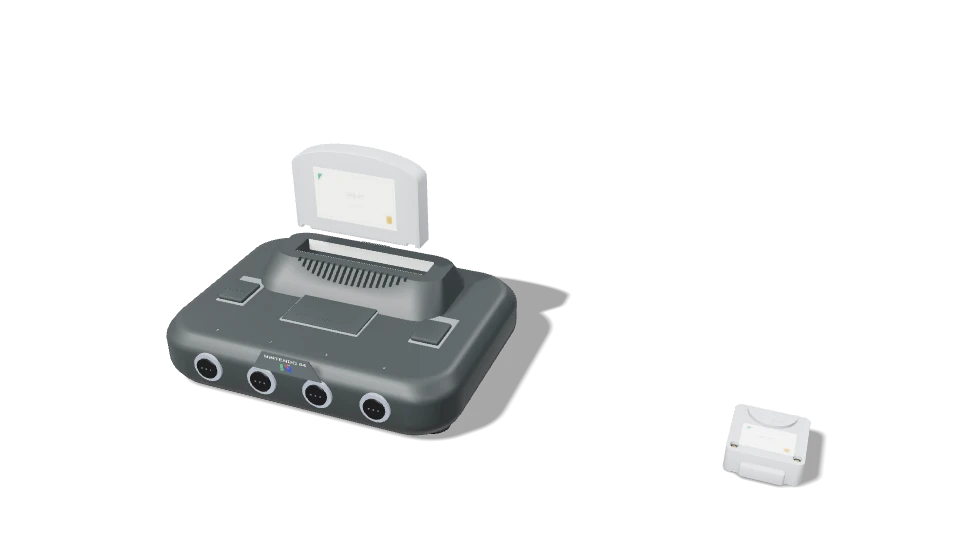
Nintendo 64
The cartridge moves through the insertion and removal sequence beside the console and its memory accessory.
Open recording ↗Xbox 360
The authored tray mechanism, optical media, and memory unit are presented together in the platform-specific preview.
Open recording ↗Nintendo Entertainment System
A front-loading cartridge sequence translates the familiar physical ritual into a reusable launch presentation.
Open recording ↗Nintendo GameCube
The console lid, smaller optical disc, and memory accessory form one coordinated preview.
Open recording ↗Silent, stylized hardware recreations. These clips show the full preview cycle, not game footage. Hardware shapes are visual interpretations; manufacturer affiliation and exact physical fidelity are not implied.
From the idea
to the implementation.
- 01
Define the experience and its boundaries
I specified a local Windows dashboard that installs only what the user selects, keeps saves safe, and makes the state of each operation visible. Recovery and removal were part of the requirements from the beginning.
- 02
Build a recoverable installation workflow
The implementation connects source identities, resumable transfers, verified cached bytes, storage budgets, and recorded installation manifests. Queue controls let a user change priorities without starting every download again.
- 03
Turn hardware into reusable visual performances
I directed a Blender asset pipeline covering consoles, physical media, and accessories. Exported GLB scenes carry named motion clips; a shared Three.js viewer composes the correct pieces, fits the camera to their motion, and plays the loading mechanism.
- 04
Package for someone else’s computer
The installer wraps the released executable, offers a library location, and creates shortcuts. A clean-room installation starts without personal history, credentials, saves, or installed games; uninstall checks verify that the user’s library remains.
Decisions that
shape the system.
Make installation selective and recoverable
The queue works on selected items, records the chosen destination, reuses verified downloads, and offers pause, resume, retry, and priority controls. Storage planning accounts for staging and shared dependencies.
Keep saved progress separate from removable software
Removal starts with a preview. The application tracks installed files, checks for changes, and preserves saves and modified files. The Windows uninstaller removes the dashboard program and shortcuts while retaining the library.
Connect the animation to the platform
A catalogue resolves each platform to its console, compatible media, and accessories. Named animation clips coordinate cartridge insertion, disc mechanisms, and memory devices. Known digital titles do not acquire an invented physical disc.
Make presentation optional
The short launch presentation is skippable; the full preview shows the insert-and-eject cycle. Reduced-motion behavior provides a still and immediate handoff. Hidden views pause, and the renderer is disposed after use.
- Select a title
- Plan storage & dependencies
- Download & verify
- Present the console
- Launch a scoped session
Inside the implementation
A Python application coordinates the local library database, source catalogue, download queue, installation records, and process sessions. The browser interface talks to a token-protected local API. The presentation layer loads packaged GLB models exported from Blender into Three.js; a platform-to-asset catalogue keeps the correct console, media, and accessory together. Preview and launch modes share the authored clips while using different playback timing. Recipients do not need Blender installed.
TAKE IT FOR A SPIN
Your library.
Your desktop.
Retro Library Dashboard 1.8.0 is available free of charge. Download the actual Windows setup executable directly—no website account or checkout required.
Download free Windows installer ↓Windows 10 or later · x64 · 119 MB (113.4 MiB)
Installer built November 2, 2026 · Unsigned build
What’s in the download
- The released dashboard application and its console animation assets.
- A folder chooser, Start Menu shortcut, and optional desktop shortcut.
- A configured shared-library connection; its availability depends on the source remaining accessible.
- An uninstaller that retains your library, saves, settings, and downloaded sources.
Installed games, emulators, personal saves, account credentials, and play history are not bundled. Game content and any required emulator support files are obtained separately.
File integrity & installation notes
This build is not code-signed. Its publisher identity is therefore not verified by a Windows signing certificate. The checksum identifies the exact file offered here.
Close a running dashboard before installing. Choose the folder where you want the library to live; the installer does not require administrator rights.
SHA-2561494cc3c36a9865bbbfe456dbf7eba90eec727f4c49d27b7e8be181af6536f43
What the work
demonstrates.
- Platform-aware visual catalogue
- 31 families
- Console, media & accessory models
- 88 assets
- Freely downloadable Windows build
- 1.8.0
Version 1.8.0 is packaged as a Windows installer with a library-folder chooser, shortcuts, and a preservation-aware uninstaller. The visual catalogue covers 31 system families and 88 console, media, memory, and accessory assets. Four recordings on this page show the actual N64, Xbox 360, NES, and GameCube preview sequences from this build.
Why it matters to a client
The work combines an engaging product interface with the less visible engineering that makes software useful: recoverable operations, storage planning, scoped process control, data preservation, and a repeatable Windows release.